案例库
Testimonial.to:免费档永远带品牌,去掉它是付费权益
客户证言工具的免费档不拦截提交:额度用完后客户仍能继续送证言,只是你看不到;官方帮助中心写明免费档永远显示 Made with Testimonial 品牌,关闭它是付费档的开关。
免费档收集不停、访问才停,品牌永远露出。

产品实景
产品长什么样
以下截图来自产品官方公开页面,用来说明产品用途,不代表合作、背书或经营结果证明。
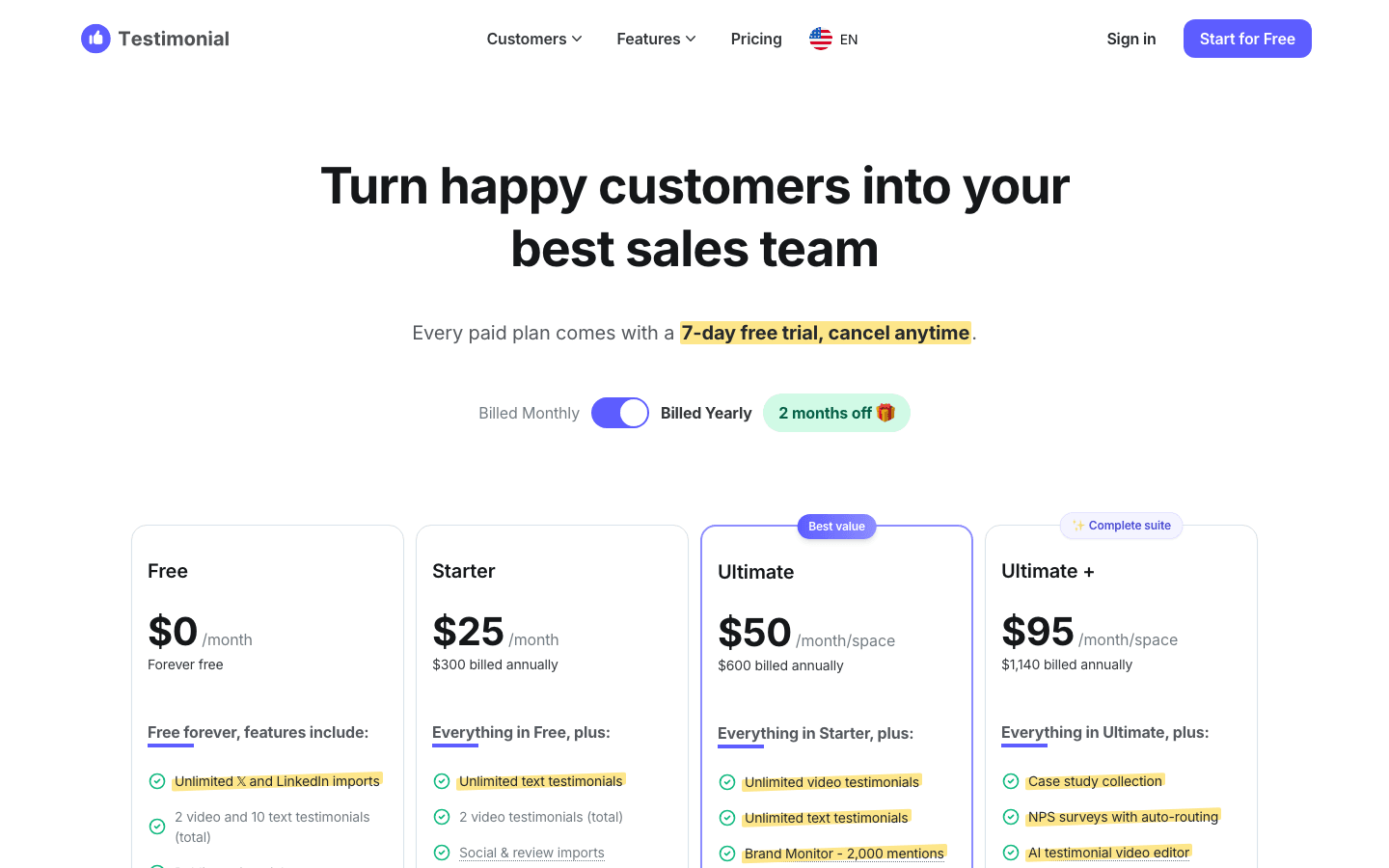
Testimonial - Our Pricing
官方定价页首屏:H1、月付/年付开关与四档卡片的档位名和价格(Free $0/Starter $25/Ultimate $50/Ultimate + $95);对比表与去品牌那一行在 y≈3254,不在本图内。
Testimonial.to 官方定价页 · 访问于 2026/10/3
查看官方产品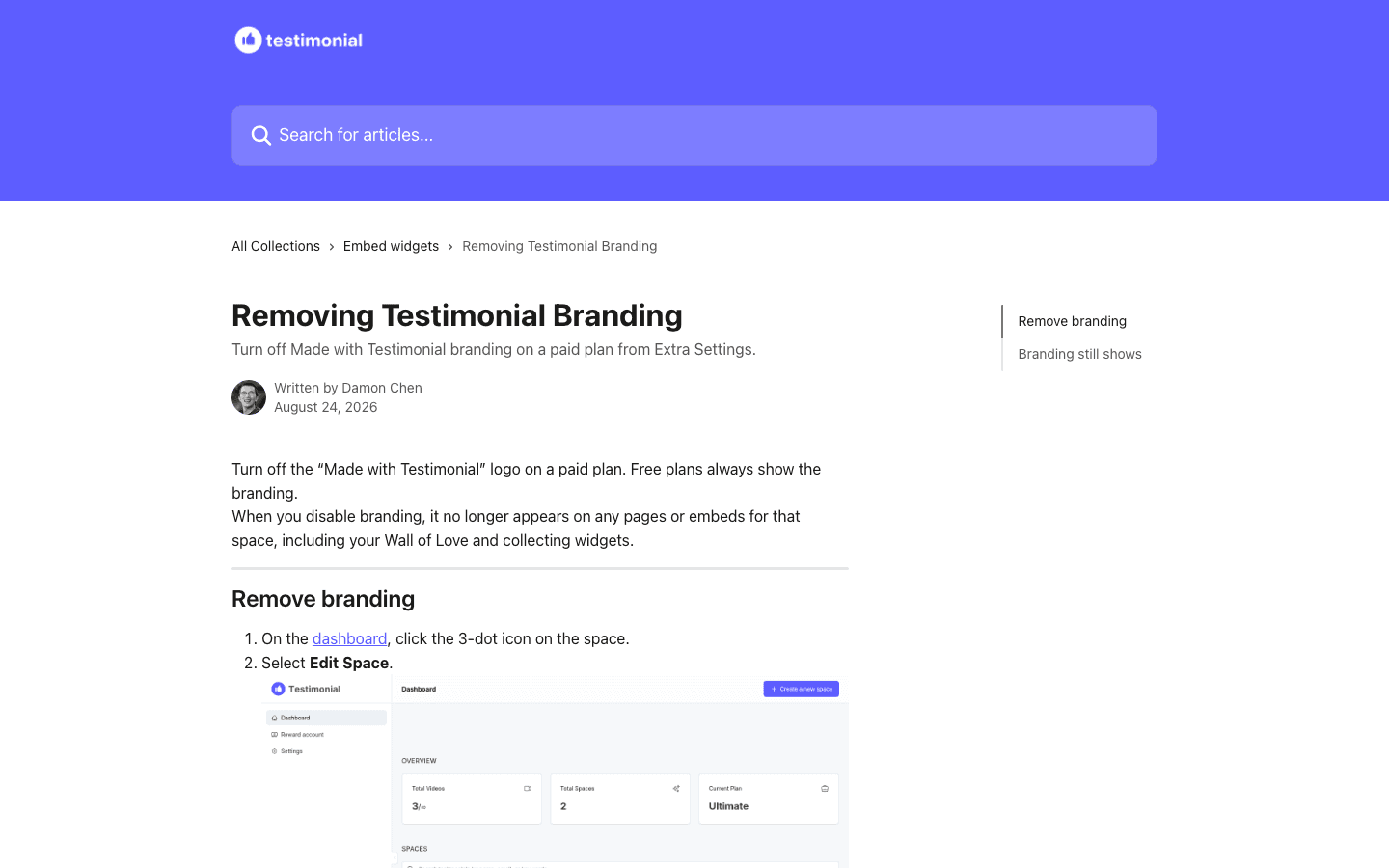
Removing Testimonial Branding
官方帮助中心该文首屏:标题、署名 Written by Damon Chen 与关键句 Free plans always show the branding;正文的操作步骤(Edit Space → Extra Settings)在首屏之外,故本文不据本图断言步骤顺序。
Testimonial.to 官方帮助中心(Intercom) · 访问于 2026/10/3
查看官方产品60 秒结论
一分钟看懂这篇文章
免费档收集不停、访问才停,品牌永远露出。
人负责
- 帮助中心两位作者署名
- 客服按档位分成四层
- 企业档走人工报价
AI 负责
- 付费档列出五项 AI 能力
- 免费档这几行全为空
- 供应商与成本未公开
- 复核定价页档位与对比表
- 读帮助中心品牌文档
- 核对额度与下载边界
- 标注页面内部矛盾
直接结论
Testimonial.to 是一个收集并展示客户证言的 SaaS:用收集表单与邮件邀约向客户收取文字、视频与社交平台证言,聚合成公开的 Wall of Love 页面,再以嵌入小组件放进客户自己的网站。它值得一人公司看的是三件事同时成立:
- 免费档的闸门画在「访问」而不是「收集」上。 免费额度是「2 video and 10 text testimonials (total)」,但官方 FAQ 写得很清楚:「Your customers can continue to submit testimonials after your free credits (10 text and 2 video) are used up; submissions will never be blocked or stopped.」——客户照送,你只是看不到。
- 免费档的产出物上永远带自家品牌。 帮助中心原文是「Free plans always show the branding.」,而关闭品牌(Remove Testimonial branding)是付费档 Extra Settings 里的开关;关闭后「it no longer appears on any pages or embeds for that space, including your Wall of Love and collecting widgets」。
- 同一块品牌位兼作联盟入口。 帮助中心写「Paste your Testimonial affiliate link so the Made by Testimonial mark on your Wall of Love uses it」,并把分佣写成「a 30% recurring commission」。
归属边界:官方没有团队页,也没有法人主体页——/about、/terms、/help 三条路由本轮实测都只返回 5 177 B 的应用外壳(<title> 相同、无可读正文)。可核查的署名只在帮助中心,共有 Damon Chen 与 Daniel Pinzon 两位作者。因此本文取 operator-led-product,不写一人公司,也不指认创始人。
证据状态
- 当前公开事实(2026-10-03 本轮逐字复核):定价页的四档价格与对比表逐行、帮助中心 5 篇文章的原文与署名、帮助中心 sitemap 列出的 224 篇文章、首页的嵌入代码与 50,000+ 自报口径。本轮
https://www.testimonial.to/pricing/301 到https://testimonial.to/pricing/后为 200(103 KB);https://www.testimonial.to/的根路径在本机连续两次超时(20 s/45 s,curl返回 000),而规范域名https://testimonial.to/为 200(117 KB),故本文所有来源均写规范域名。 - 官方自述(未经独立审计):「Trusted by 50,000+ businesses that value social proof」(定价页与首页同一句)、「The fastest-growing teams turn customer love into their #1 growth channel.」、各档位的功能清单。
- 本文的编辑判断:把「免费档不拦提交、只拦访问」读成一套可复制的免费档边界;把「品牌挂在客户对外页面上+关闭品牌是付费权益」读成露出型 PLG 的定价结构;把联盟链接与品牌徽标共用同一位置读成一次露出两次用途。
- 未公开:营收与 MRR/ARR、付费客户数、免费转付费比例、毛利与基础设施成本、品牌露出的曝光量或点击率、联盟计划的实际支出、团队人数与雇佣形态、法人主体与注册地、模型供应商与 AI 推理成本。
- 一处来源内部矛盾(照录,不替官方调和):定价页的档位卡把「White-label widgets」同时列进 Free 与 Starter 的功能清单,而同一页的对比表把「Remove Testimonial branding」只给 Ultimate 与 Ultimate + 打勾。详见下文单列一节。
主体与归属:没有团队页,只有帮助中心的两个署名
- 三条可能给出主体信息的路由都是空壳。 本轮实测
https://testimonial.to/about、/terms、/help均返回 HTTP 200 但只有 5 177 B,<title>都是「Testimonial — Capture, measure & showcase customer love」,页面正文是「You need to enable JavaScript to run this app.」的应用外壳。没有团队页、没有法人主体、注册号或地址。 - 可核查的署名在帮助中心。 本文引用的 5 篇文章里,署名是 Damon Chen(《Removing Testimonial Branding》《Can I download video testimonials on the free plan or after downgrading?》)与 Daniel Pinzon(《What happens after 2 free videos?》《Why my Wall of Love shows Testimonial branding?》《How to Add Your Affiliate Link to Your Wall of Love》),页面标注日期为 2026-08-24 或「Updated over 2/3 weeks ago」。
- 两处间接线索,仅作线索。 首页的 Intercom 客服头像
alt="Damon"(出现 2 次),以及首页嵌入示例指向的jsfiddle.net/damonchen/0xdrsy3h/1/。这两处与帮助中心署名同向,但不构成团队规模证据,本文不据此写「一人公司」,也不写「创始人是某某」。 - 结论:
kind取operator-led-product,teamStatus只写「官方无可核查的团队页或法人主体页;帮助中心文章署名两位作者,团队规模未公开」。
免费档的边界:收集不停,访问才停
定价页的四档(2026-10-03 抄录,页面默认显示 Monthly):
| 档位 | 月价 | 年付 | 关键边界(对比表原文) |
|---|---|---|---|
| Free | $0,写「Forever free」 | — | Text testimonials 10 (total);Video testimonials 2 (total);Spaces 1;Video time limit 2 min;Public Wall of Love page ✓;Embed widgets ✓ |
| Starter | $25 | $300 billed annually | 文字不限;Video testimonials 2 (total);Custom domain & theme color ✓ |
| Ultimate | $50 /month/space | $600 billed annually | 视频不限;Spaces「1 (+$600/year per extra)」;Team seats 5 account + 3 / space |
| Ultimate + | $95 /month/space | $1,140 billed annually | Case study collection、NPS surveys、Spaces「1 (+$1,140/year per extra)」、Team seats 不限、SOC 2 Type II compliant |
| Enterprise | Custom Pricing | — | SSO、PO / invoices、Dedicated success manager |
- 所有付费档都带 7 天试用:「Every paid plan comes with a 7-day free trial, cancel anytime.」(页面该串出现 8 次)。
- 免费档不拦提交,只拦访问(定价页 FAQ 原文):「Your customers can continue to submit testimonials after your free credits (10 text and 2 video) are used up; submissions will never be blocked or stopped. To access any testimonials you receive beyond your free limit, you’ll need to upgrade your plan.」
- 执行细节在帮助中心:「Clients can still send video testimonials after you hit the 2 free videos.」「Extra video submissions stay in your account until you upgrade.」——数据真的入库,只是留在账号里看不到。
- 额度与已得资产分开:另一篇帮助文档写「Credits control new collection, not downloads of videos you already have.」「This works on all plans. There is no separate download quota in the app.」即停付或降级后,已经收到的视频仍能下载。
- 免费档的两个视频额度是「账户级」的:「Video testimonial credits count how many new video testimonials your account can still receive. New accounts on the Free plan start with 2 credits. Starter also includes 2 video testimonials.」——Starter 并没有比免费档多给视频额度,多的是文字不限与自定义域名。
- 视频时长限制随档位变化:Free 与 Starter 为 2 min、Ultimate 与 Ultimate + 为 5 min(FAQ 原文:「On the Free plan, each video can be up to 2 minutes long, while the Ultimate plan increases this limit to 5 minutes.」)。
品牌露出:免费档永远显示 Made with Testimonial
这是本案例的核心机制,官方有两篇帮助文档交叉印证:
- 谁能关、在哪关(《Removing Testimonial Branding》,署名 Damon Chen,2026-08-24):「Turn off Made with Testimonial branding on a paid plan from Extra Settings.」「Turn off the “Made with Testimonial” logo on a paid plan. Free plans always show the branding.」「When you disable branding, it no longer appears on any pages or embeds for that space, including your Wall of Love and collecting widgets.」
- 关了还看到怎么办(《Why my Wall of Love shows Testimonial branding?》,署名 Daniel Pinzon):「Removing Testimonial branding is available on paid plans. Free plans always show the branding.」「If you are on a paid plan and branding is still visible, check whether the space has an affiliate link. When an affiliate link is added, the Testimonial emblem stays on the Wall of Love so your affiliate link can sit next to it.」
- 免费与 Starter 的证言墙也带品牌(《What happens after 2 free videos?》):「On Free and Starter, the Wall of Love shows up to 2 videos, with our branding.」
三点必须写清的边界:
- 露出位置的原文依据是「关闭后不再出现于哪些位置」——官方用「no longer appears on any pages or embeds for that space, including your Wall of Love and collecting widgets」来描述关闭效果,本文据此写「品牌出现在该 space 的页面与嵌入(含 Wall of Love 与收集小组件)」,不进一步断言它在页脚、水印或视频画面内的具体形态。
- 同一块位置兼作联盟入口(《How to Add Your Affiliate Link to Your Wall of Love》原文):「Paste your Testimonial affiliate link so the Made by Testimonial mark on your Wall of Love uses it.」「Earn a 30% recurring commission. Referred customers get 15% off their first year.」并且付费档加了联盟链接后徽标会保留(见上一条引文)——即这块品牌位在付费档里仍然可以是联盟载体。
- 露出的效果官方一个字都没公布:没有曝光量、点击率,也没有「品牌带来多少注册」的任何数字。本文只写它在哪出现、什么时候能关,不写它多有效。
一处页面内部矛盾:档位卡说 Free 有白标,对比表说品牌要去不掉
这是本轮最容易写错的一处,如实照录:
| 位置(同一张定价页) | 原文 | 指向 |
|---|---|---|
| Free 档位卡的功能清单 | 「White-label widgets」 | 免费档可白标 |
| Starter 档位卡的功能清单 | 「White-label widgets」 | Starter 也可白标 |
| 对比表「Remove Testimonial branding」一行 | Free —/Starter —/Ultimate ✓/Ultimate + ✓ | 去掉品牌是 Ultimate 起的权益 |
| 帮助中心两篇文档 | 「Free plans always show the branding.」 | 与对比表一致 |
本轮实测「White-label widgets」在该页出现 2 次,位置分别在 Free 卡与 Starter 卡内(按页面字节位置核到:Free 卡内一次在 $25 之前,Starter 卡内一次在 $25 与 $50 之间);「Remove Testimonial branding」出现 1 次,在对比表里,四个单元格的取值是 —/—/✓/✓(两列灰色减号、两列绿色对勾)。
本文以帮助中心与对比表为准——理由是这两处更细、且互相印证;同时把矛盾原样写出,因为对读者有用的正是这条教训:营销文案与功能矩阵打架时,去看更细的那张表和帮助文档。
分发面:嵌入小组件与「产出物即露出」
- 嵌入形态在免费档全开:对比表「Embed widgets (Wall of Love, single, collecting)」在 Free 列即为打勾;首页给出可直接粘贴的代码——引入
https://testimonial.to/js/widget-embed.js的 script 标签,加一个带data-url的div。 - 官网自己就是样本:定价页原文「Our Wall Of Love … check it out!」与「Trusted by 50,000+ businesses that value social proof」,首页同样用客户证言(含 𝕏 与 LinkedIn 的提及)铺满首屏。
- 官方对「不用写代码」的强调:首页写「Add testimonials to your website with no coding!」「We support any no-code platform (Webflow, WordPress, you name it!)」;帮助中心另有 10 余篇按平台分的嵌入教程(Webflow/WordPress/Wix/Carrd/Notion/Bubble/React/Vue/Nuxt/Squarespace/Framer 等),本文引用其 sitemap 作为这些文章存在的依据。
- 一条要分开算的账:免费档的露出之所以算分发,是因为它出现在客户对外的页面上;但官方没有公布过这条路径带来多少流量或注册,故本文不把它写成「增长引擎」,只写成「露出位置与开关的归属」。
付费档里的 AI 能力(本文不写「与 AI 无关」)
与站内此前的桌面软件案例不同,这条案例不能写 AI 零命中——定价页对比表把 AI 能力按档位列得很清楚:
- 「AI space & style generator」「Video auto-transcription」「AI case study generator」「Video metrics & sentiment analysis」四行:Free 与 Starter 两列均为空,Ultimate 与 Ultimate + 两列打勾;Ultimate + 的档位卡另列「AI testimonial video editor」。
- 品牌监测分组:「Brand Monitor」下的 Keywords(Ultimate 10/Ultimate + 15)与 Monthly mentions(2,000/5,000),配合 sentiment analysis 做情绪判断。
- 免费档没有上述任何一项:Free 列在这几行均为空,免费档拿到的是「Unlimited 𝕏 and LinkedIn imports」与 2 视频 + 10 文字证言的额度。
- 成本侧仍然空白:本轮未核到官方对模型供应商、推理用量或 AI 成本的任何披露,故不写。
不贴的标签及理由
- 不贴
automation-operations:自动邀约(T.E.A.)在官方页面里是付费档的产品功能(Automated email invitations 在 Free/Starter 为空),属于「自动化功能」,而不是「主体自身运营被自动化」的一手自述——正落进该标签的 excludes。 - 不贴
content-acquisition:站点确有内容面(帮助中心 224 篇文章、按平台分的嵌入教程、客户故事与博客入口),但官方没有任何一处把文章、教程或客户故事写成用户发现或转化的来源。按 Bannerbear/Buttondown/SavvyCal/MarsEdit/Many Tricks 已确立的口径(该标签要求官方第一手自述),本文不贴。 - 不贴
narrow-scope:官方页面没有任何「主动舍弃功能以缩小范围」的自述;免费档的额度上限是定价分层,不是产品范围的主动收缩。 product-led-growth的依据只用产品内路径:免费档产出物(Wall of Love 页面与三种嵌入小组件)自带 Made with Testimonial 品牌,且这块位置可挂联盟链接——不是「有免费层」这种泛化理由。
截图说明
两张截图取自不同出处、不同 slug,写盘后回读 6 个资产全部 1440×900:
testimonial-official-pricing(https://testimonial.to/pricing/):本模型无图像输入,故用 Playwright 在 1440×900 逐元素落框核实视野——首屏内是 H1「Turn happy customers into your best sales team」(top=160)、Monthly/Yearly 开关 (416),以及四档卡片的档位名 (577) 与价格 (635–675)、Free 档的「Forever free」(679);而**「Remove Testimonial branding」一行在 top=3254**、「Trusted by 50,000+」在 top=1537、「Get started」按钮在 top=1180,都在视野之外,故该图的 description 只写档位名与价格,并明确写出去品牌那一行不在图内。testimonial-official-branding(帮助中心《Removing Testimonial Branding》):首屏内是标题 (top=244)、署名「Written by Damon Chen」(392) 与关键句「Free plans always show the branding.」(474–523);正文的操作步骤在首屏之外,故 description 明确写「不据本图断言步骤顺序」。
可复制的部分
- 把升级闸门放在「访问」而不是「收集」上:免费额度用完后客户仍可提交、数据照常入库,只有查看需要升级(原文「submissions will never be blocked or stopped」+「Extra video submissions stay in your account until you upgrade」)。
- 让免费档的产出物带上自己的品牌,再把「关闭品牌」写成一行付费权益:「Free plans always show the branding.」+ Extra Settings 里的 Remove Testimonial branding。
- 把品牌位同时做成联盟入口:同一块徽标可挂推荐链接,官方分佣 30% recurring、被推荐客户首年 15% off。
- 嵌入形态在免费档全开:整面墙、单条证言、收集表单三种形态都从 Free 起可用,用户先能把产品放进自己的站点,再谈升级。
- 额度与已得资产分离:credits 只限制新增收集,已收到的视频在所有档位都能下载,降级也不收回。
- 把折扣写进公开 FAQ:bootstrappers 与 non-profits 折扣直接写在定价页问答里。
- 把「为什么你还看到品牌」写成排障问答:先查档位、再查联盟链接,把重复客服问题变成自助文档。
不可复制的部分
- 「证言墙」这一品类的心智与域名:站点域名本身就是品类词,加上官方自报的 50,000+ businesses 规模,后来者很难复制同一个搜索与品牌位置。
- 联盟体系的结算成本:30% recurring 意味着长期分账、退款与税务处理,不是加一段文案就能上线。
- 视频证言的托管、转码与播放基础设施:免费档就要承担 2 条视频的存储与播放,属于随用户规模增长的固定成本。
- 多渠道收集面(𝕏、LinkedIn 与 10+ 评论站点导入):免费档已把这项当默认能力,背后是长期对接与维护。
- 社交证明存量:官方自报的 50,000+ businesses 是多年积累结果,无法靠定价设计追赶。
从案例到行动
前 30 天怎么借鉴
不照搬结果,只把案例中可复制的方法拆成三个验证阶段。每一步都要结合自己的客户证据重新判断。
第 1–7 天
收窄问题
把升级闸门放在「访问」而不是「收集」上:免费额度用完后客户仍可继续提交、数据照样入库,只是要升级才能看到(原文「submissions will never be blocked or stopped」)
第 8–14 天
验证流程
让免费档的产出物带上自己的品牌,再把「关闭品牌」写成一行付费权益(原文「Free plans always show the branding.」+ Extra Settings 里的 Remove Testimonial branding)
第 15–30 天
形成闭环
把品牌位同时做成联盟入口:同一块徽标可挂推荐链接,官方给出的分佣是 30% recurring、被推荐客户首年 15% off
来源
- 官方定价页(`https://www.testimonial.to/pricing/` 301 到本站;原文:「Turn happy customers into your best sales team」「Every paid plan comes with a 7-day free trial, cancel anytime.」「Free $0 /month」「**Forever free**」「2 video and 10 text testimonials (total)」「White-label widgets」「**Remove Testimonial branding**」「Trusted by 50,000+ businesses that value social proof」;FAQ 原文:「Your customers can continue to submit testimonials after your free credits (10 text and 2 video) are used up; **submissions will never be blocked or stopped.** To access any testimonials you receive beyond your free limit, you'll need to upgrade your plan.」「Do you offer discount? … We offer discounts for bootstrappers and non-profits.」;对比表逐行:Text testimonials 10 (total)/Video testimonials 2 (total)/Video time limit 2 min/Public Wall of Love page/Embed widgets (Wall of Love, single, collecting)/Custom domain & theme color/Team seats/Support)核查于 2026/10/3
- 官方首页(原文:「Capture, measure & showcase customer love」「The fastest-growing teams turn customer love into their #1 growth channel.」「Start for Free」「Get started with free credits on us」「Trusted by 50,000+ businesses that value social proof」「Add testimonials to your website with no coding! … We support any no-code platform (Webflow, WordPress, you name it!)」,并给出嵌入代码片段 `<script async type="text/javascript" src="https://testimonial.to/js/widget-embed.js"></script>` 与 `<div class="testimonial-to-embed" data-url=…>`;本轮实测该页 `branding`/`White-label`/`Made with Testimonial` 命中均为 0,页脚客服头像 `alt="Damon"`、嵌入示例指向 `jsfiddle.net/damonchen/…`)核查于 2026/10/3
- 官方帮助中心《Removing Testimonial Branding》(**核心来源**;归类 Embed widgets,署名 Written by **Damon Chen**,页面标注 August 24, 2026;原文:「Turn off **Made with Testimonial** branding on a paid plan from Extra Settings.」「Turn off the “Made with Testimonial” logo on a paid plan. **Free plans always show the branding.**」「When you disable branding, it no longer appears on any pages or embeds for that space, including your Wall of Love and collecting widgets.」「On the dashboard, click the 3-dot icon on the space. Select Edit Space. Open Extra Settings, then turn on Remove Testimonial branding.」)核查于 2026/10/3
- 官方帮助中心《Why my Wall of Love shows Testimonial branding?》(归类 FAQs,署名 Written by **Daniel Pinzon**,页面标注 August 24, 2026;原文:「Removing Testimonial branding is available on paid plans. **Free plans always show the branding.**」「If you are on a paid plan and branding is still visible, check whether the space has an affiliate link. When an affiliate link is added, the Testimonial emblem stays on the Wall of Love so your affiliate link can sit next to it.」)核查于 2026/10/3
- 官方帮助中心《What happens after 2 free videos?》(归类 FAQs,署名 Written by **Daniel Pinzon**,页面标注 August 24, 2026;原文:「Clients can still send video testimonials after you hit the 2 free videos. To access those videos, start a Starter, Ultimate, or Ultimate+ plan from Settings → Plan or the pricing page.」「**On Free and Starter, the Wall of Love shows up to 2 videos, with our branding.**」「**Extra video submissions stay in your account until you upgrade.**」)核查于 2026/10/3
- 官方帮助中心《Can I download video testimonials on the free plan or after downgrading?》(归类 FAQs,署名 Written by **Damon Chen**,页面标注 Updated over 2 weeks ago;原文:「Yes. On the Free plan or after you downgrade, open a Space and go to Inbox to download any video you have already received.」「**Credits control new collection, not downloads of videos you already have.**」「Free and Starter include 2 video credits. They do not limit downloads of videos already in your account.」「This works on all plans. **There is no separate download quota in the app.**」)核查于 2026/10/3
- 官方帮助中心《How to Add Your Affiliate Link to Your Wall of Love》(归类 Affiliate program,署名 Written by **Daniel Pinzon**;原文:「Paste your Testimonial affiliate link so the **Made by Testimonial mark on your Wall of Love uses it**.」「In the space editor, click Extra Settings. Paste your affiliate link and click Update. The Made by Testimonial box on your Wall of Love uses the link you pasted.」「**Earn a 30% recurring commission. Referred customers get 15% off their first year.**」)核查于 2026/10/3
- 官方帮助中心知识库首页(由 Intercom 托管,页脚原文「We run on Intercom」;其 sitemap 列出 **224 篇文章**,本文引用的 5 篇均在其中,另有《All-in-one: Extra settings for your space》与《Our affiliate program》两篇被上述文章交叉引用)核查于 2026/10/3
- 站内 `/about` 路由(**实测为 5 177 B 的应用外壳**,`<title>` 为「Testimonial — Capture, measure & showcase customer love」,无可读正文;`/terms` 与 `/help` 返回同样大小的同一外壳)——本文据以说明官方**没有**可核查的团队页或法人主体页,故不写一人公司、也不指认创始人核查于 2026/10/3